No-Code vs Headless vs Traditional CMS: Complete Comparison Guide for 2026
You’re building a new product. Or relaunching a website. Or scaling into new markets. And everyone around you has an opinion “Just use WordPress,” “Go headless,” “Webflow is enough.”
The problem? Most of that advice is based on what worked for someone else’s project, not yours.
The CMS you choose in 2026 will shape your content operations, your development speed, your SEO performance, and your ability to scale. Getting it wrong means expensive migrations, frustrated developers, or a product that can’t grow with your business.
This guide breaks down the three main CMS categories no-code, traditional, and headless without bias. Not to push one over the other, but to help you make the right call based on your actual situation.
Not sure where to start? Let’s help you choose the right CMS for your business.
What is a No-Code CMS?
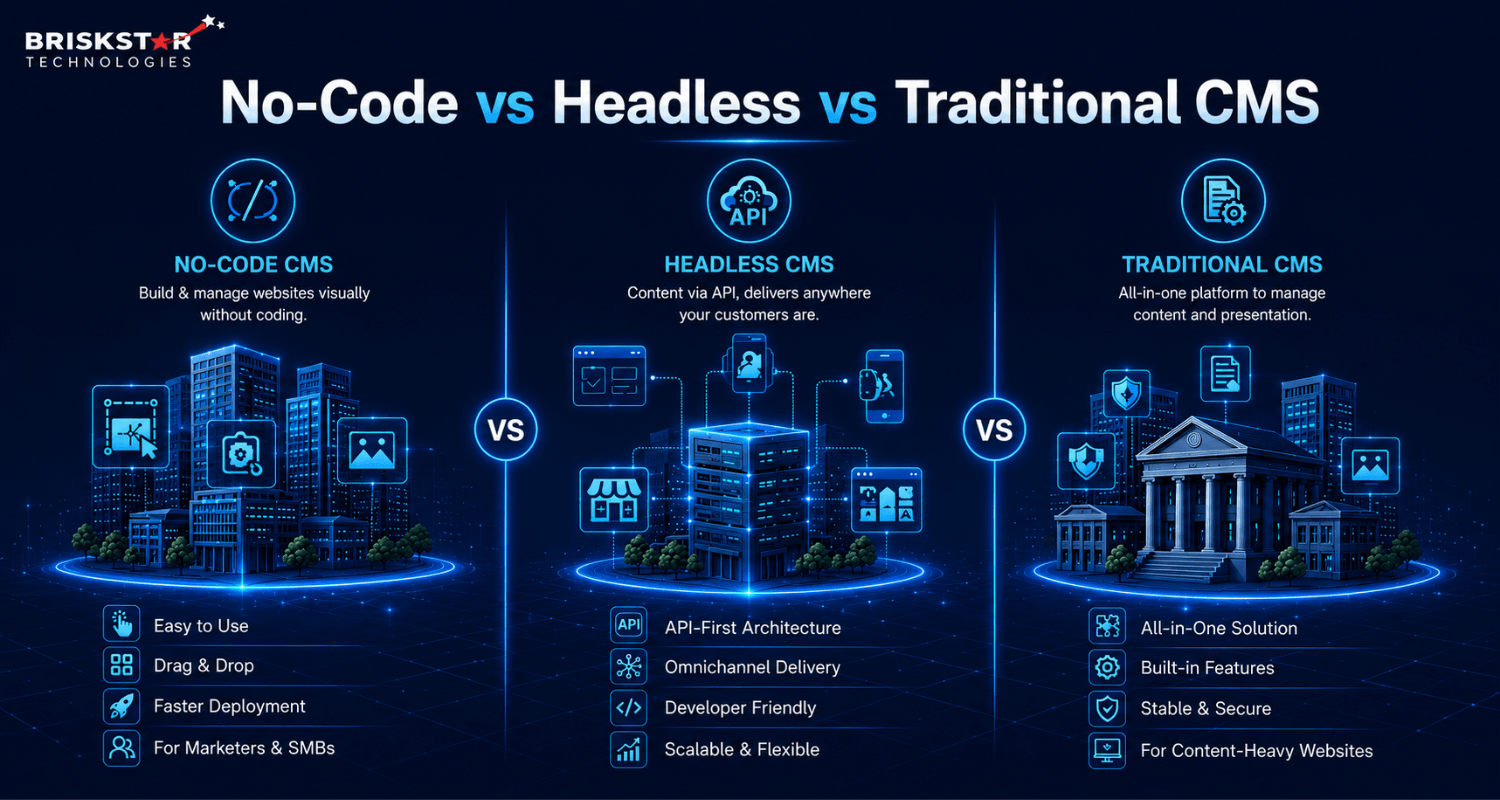
A no-code CMS is a platform where you build and manage your website entirely through a visual interface with no coding required.
You drag, drop, click, and publish. The platform handles the infrastructure, design system, and content management all in one place.
Examples: Webflow, Wix, Squarespace, Framer, Shopify (for ecommerce)
Best for: Founders, marketers, small business owners, or anyone who wants a live website without hiring a developer.
What you can do with it:
- Build landing pages and marketing sites fast
- Manage content without touching code
- Launch MVP websites in days, not weeks
- Connect third-party tools via integrations
What you can’t do with it:
- Build complex custom functionality without workarounds
- Handle high-traffic ecommerce at scale
- Connect to external frontends (mobile apps, IoT, digital signage)
- Customize deeply at the code level
No-code CMS platforms are genuinely powerful for the right use case. But they have a ceiling and when you hit it, migration is painful.
What is a Traditional CMS?
A traditional CMS (also called a monolithic CMS) manages both your content and your frontend in one system. You log in, write content, and the same platform renders it for your website visitors.
Examples: WordPress, Joomla, Drupal, Typo3
Best for: Bloggers, content-heavy websites, marketing teams, businesses that need SEO muscle and a large plugin ecosystem.
This is the category that still powers a massive portion of the internet WordPress alone runs around 43% of all websites. There’s a reason for that. It works, it’s well-documented, and almost any developer can support it.
What you get:
- Huge plugin libraries (SEO tools, page builders, forms, ecommerce)
- Familiar editorial workflow
- Strong built-in SEO control
- Large talent pool easy to hire developers and content editors
- Cost-effective for standard web projects
Where it struggles:
- Monolithic architecture means frontend and backend are tightly coupled
- Scaling for high performance requires heavy optimization
- Not built for omnichannel delivering content to apps, kiosks, or multiple platforms is messy
- Plugin bloat can create security vulnerabilities and performance issues
Traditional CMS is not outdated. It’s just not built for every use case.
What is a Headless CMS?
A headless CMS separates your content (the backend) from how it’s displayed (the frontend). Instead of rendering pages itself, it delivers content via an API which any frontend, app, or device can consume.
Think of it like this: the traditional CMS is a packaged meal (everything included). A headless CMS is raw ingredients your dev team builds the meal exactly how they want it.
Examples: Contentful, Strapi, Sanity, Prismic, Directus
Best for: Development teams building multi-platform products, SaaS companies, enterprise systems, or businesses with complex content delivery needs.
What makes headless powerful:
- One content source, delivered anywhere web, mobile app, smart TV, digital signage
- Frontend built in any framework (Next.js, React, Vue, Flutter)
- Fast, high-performance sites when paired with static generation
- Full developer flexibility no templates, no constraints
- Scales cleanly for large teams and complex architectures
The tradeoffs:
- Higher upfront development cost and complexity
- Content editors need more onboarding less intuitive than WordPress
- SEO requires intentional setup (rendering strategy, metadata management)
- You’re responsible for building and maintaining the frontend
Headless CMS is not automatically better. It’s better for specific problems.
Key Differences: No-Code vs Traditional vs Headless CMS
| Feature |
No-Code CMS |
Traditional CMS |
Headless CMS |
| Setup Complexity |
Very Easy |
Easy |
Complex |
| Developer Required |
No |
Optional |
Yes |
| Flexibility |
Low |
Medium |
High |
| Performance |
Medium |
Medium |
High |
| Scalability |
Low |
Medium |
High |
| SEO Control |
Limited |
Good |
Advanced |
| Omnichannel Delivery |
No |
No |
Yes |
| Plugin/Extension Ecosystem |
Limited |
Extensive (WordPress) |
Growing |
| Content Editor Experience |
Excellent |
Excellent |
Moderate |
| Upfront Cost |
Low |
Low–Medium |
High |
| Long-Term Cost at Scale |
High (platform lock-in) |
Medium |
Lower |
| Best For |
MVPs, small sites |
Blogs, marketing sites |
Apps, enterprise, multi-platform |
Advantages of No-Code CMS
Speed:- You can go from zero to living in a day. No setup, no hosting decisions, no developer dependency. For a founder validating an idea or a marketer launching a campaign, that speed is real value.
Accessibility:- Non-technical team members can build and manage content independently. That reduces bottlenecks and gives marketing teams control.
Cost for simple projects:- If you need a clean website with basic pages and a contact form, no-code platforms are genuinely affordable, often cheaper than hiring a developer for a few days.
Built-in design systems:- Platforms like Webflow come with responsive design built in, professional templates, and CMS collections that work out of the box.
Advantages of Traditional CMS
SEO firepower. WordPress with the right setup (Yoast, Rank Math, proper hosting) is still one of the best SEO platforms available. It’s what most content teams are trained on, and the ecosystem reflects that.
Plugin ecosystem. Need forms, payments, CRM integration, membership gating, multilingual content? There’s a plugin for it. That ecosystem saves enormous development time for standard requirements.
Lower barrier to hire. WordPress developers are everywhere. Content editors trained on it don’t need onboarding. That talent availability matters at scale.
Proven at medium scale. For content-heavy businesses media sites, blogs, agency websites, marketing hubs traditional CMS handles it well. Thousands of companies run on WordPress without ever needing something more complex.
Advantages of Headless CMS
True omnichannel delivery:- One content model, consumed by your website, your iOS app, your Android app, your digital signage, your email system. No content duplication, no sync issues.
The performance ceiling is much higher:- When paired with a modern frontend framework and static site generation, headless architectures consistently hit top Core Web Vitals scores. That matters for both UX and SEO rankings in 2026.
Developer freedom:- Your team isn’t constrained by CMS templates or plugin limitations. They build exactly what the product needs.
Scales cleanly:- Content infrastructure can grow independently from the frontend. Large teams can work in parallel without stepping on each other.
Future-proof content model:- As new channels emerge AI interfaces, voice platforms, AR your content API is already ready to feed them.
Disadvantages of Each CMS (Honest Assessment)
No-Code CMS Limitations
- Platform lock-in is real. Moving off Webflow or Wix later is painful. Your content, design logic, and CMS structure are tied to that platform.
- Not suitable for large websites. Complex content models, large content libraries, and high-traffic handling push these platforms to their limits.
- SEO customization has a ceiling. You can cover the basics, but advanced technical SEO work (custom schema, server-side rendering control, edge caching) is limited or unavailable.
- Scaling cost. As your traffic and content grow, platform fees scale up. At a certain point, you’re paying more than a custom solution would cost.
Traditional CMS Limitations
- Tightly coupled architecture. Your frontend and backend share the same system. That makes innovation slow, changing one affects the other.
- Performance requires work. Out of the box, WordPress is not fast. Caching, CDN, image optimization, and lean plugin management are all required to compete on Core Web Vitals.
- Not built for multi-platform. Delivering the same content to a mobile app alongside your website is possible but clunky it’s not what monolithic CMS was designed for.
Headless CMS Limitations
- Higher upfront investment. You need a development team to build and maintain the frontend. That’s not optional.
- Content editor experience takes work. Editors used to WordPress will find headless CMSs less intuitive. You’ll need documentation, training, and likely some custom editorial tooling.
- SEO requires intentional setup. Server-side rendering, metadata management, and crawlability need to be deliberately architected. It doesn’t come packaged like it does with WordPress + Yoast.
- Overkill for simple use cases. If you’re running a blog or a five-page business site, headless adds complexity that delivers zero additional value.
When Should You Choose No-Code CMS?
Choose no-code if:
- You’re validating a product idea and need a fast, functional web presence
- You’re a small business with standard web requirements (services, portfolio, contact)
- Your team is non-technical and needs to manage content independently
- You’re building landing pages or marketing microsites on a tight timeline
- Budget is limited and you need to avoid developer costs for the foreseeable future
We’ve worked with startups that launched on Webflow, validated their market, generated early revenue, and then migrated to a proper stack once they had product-market fit. For them, no-code was exactly the right decision at that stage.
When to avoid it: If you have plans to build a mobile app, scale content operations significantly, or need advanced technical SEO don’t start here. You’ll migrate anyway, and it’ll cost more later.
When Should You Choose Traditional CMS?
Choose traditional CMS if:
- You’re building a content-heavy website blog, news site, knowledge base, agency site
- SEO is a primary growth channel and you need reliable, proven tooling around it
- Your team is non-technical but content editors need to be self-sufficient
- You have a standard web presence (no mobile app, no multi-platform distribution)
- Budget is moderate and you need a fast, well-documented path
A client of ours, a healthcare information platform runs entirely on WordPress. They publish hundreds of articles a month, rely heavily on organic traffic, and their content team manages everything without developer involvement. For them, moving to headless would create complexity with no meaningful return.
When to avoid it: If you’re building a product (SaaS, app, marketplace) or need to deliver content across multiple platforms, traditional CMS will become a constraint rather than an asset.
When Should You Choose Headless CMS?
Choose headless if:
- You’re building a product SaaS, mobile app, marketplace, enterprise platform
- You need to deliver content across multiple channels (web + app + other surfaces)
- Performance is a core product requirement (speed, Core Web Vitals, global distribution)
- You have a development team or are budgeting for one
- You’re at a scale where developer velocity and architectural flexibility create real business value
We’ve seen companies stuck on WordPress trying to add a mobile app, running into limitations every step of the way, messy REST API outputs, fragile plugin conflicts, and a frontend that wasn’t built with API consumption in mind. Moving to a headless architecture resolved it cleanly.
When to avoid it: If you don’t have a development team, or you’re building a simple content site, headless adds cost and complexity that doesn’t pay off.
Real-World Use Cases
Startup Launch Stage A SaaS startup launching a marketing site and web app chooses Webflow for the marketing site (fast, beautiful, manageable by the growth team) and a headless CMS (Sanity) for in-app content onboarding guides, help articles, product updates. Two tools, two purposes, no overlap.
Ecommerce Business A mid-sized ecommerce brand running on Shopify (which functions as a no-code CMS for product content) layers a headless CMS on top for editorial content buying guides, lookbooks, and blogs delivered via their custom Next.js storefront. Performance scores improve significantly. Organic traffic follows.
Enterprise System A large financial services company with a web platform, mobile app, and internal tools uses Contentful as their headless CMS. One content model feeds all three. Marketing updates happen centrally and propagate everywhere. Their editorial team works from a structured content model, not a page builder.
Cost Comparison
Understanding total cost of ownership matters more than comparing monthly subscription fees.
No-Code CMS
- Upfront: Very low ($0–$50/month for basic plans)
- Development: Minimal
- Scaling cost: Significant platform fees grow with traffic and seats; migration costs are high when you outgrow it
- Best estimate for 2 years: $500–$5,000 (small site) to $15,000–$40,000 (if migration becomes necessary)
Traditional CMS (WordPress)
- Upfront: Low ($200–$2,000 for initial setup)
- Development: Moderate (themes, plugins, initial dev work)
- Ongoing: Hosting ($50–$300/month), dev maintenance, plugin licensing
- Best estimate for 2 years: $3,000–$20,000 depending on complexity and developer involvement
Headless CMS
- Upfront: High ($15,000–$60,000+ for full architecture and build)
- CMS platform: Contentful/Sanity/Strapi ($0–$500+/month depending on tier and team)
- Ongoing: Lower relative maintenance if architecture is clean; developer availability needed
- Best estimate for 2 years: $30,000–$100,000+ for enterprise; $15,000–$40,000 for mid-size products
The key insight: no-code looks cheap now but scales expensively; headless looks expensive now but scales efficiently.
Is No-Code CMS Better Than Headless CMS?
Not better.
No-code CMS is better when speed, cost, and simplicity are the priority. Headless CMS is better when performance, scalability, and multi-platform delivery are the priority.
Trying to compare them directly is like asking whether a bicycle is better than a car. Depends entirely on where you’re going and what you need to carry.
Which CMS is Best for SEO in 2026?
For standard SEO needs blogging, on-page optimization, metadata control traditional CMS (WordPress) still leads. The plugin ecosystem, editorial workflow, and community knowledge base are unmatched.
For performance-first SEO Core Web Vitals, page speed, advanced technical SEO headless CMS wins, but only when implemented correctly. Server-side rendering, edge delivery, and clean markup can push scores significantly higher than most WordPress setups.
No-code CMS covers basic SEO reasonably well but lacks the technical depth required for competitive, high-volume organic strategies.
Key 2026 SEO considerations:
- Core Web Vitals are a ranking signal headless + static generation consistently outperforms monolithic setups
- Rendering strategy matters client-side rendered headless sites without proper SSR/SSG can be invisible to crawlers
- AI search optimization favors structured, clearly authored content all three CMS types can support this with the right implementation
- No-code platforms often restrict canonical tags, schema markup control, and crawl configuration
Quick Decision Guide
| Your Situation |
Recommended CMS |
| Need a site live in a week, no dev team |
No-Code CMS |
| Building a blog or content-heavy marketing site |
Traditional CMS |
| Running a SaaS or mobile app |
Headless CMS |
| Small business, tight budget |
No-Code or Traditional |
| Enterprise with multiple digital channels |
Headless CMS |
| Ecommerce, small to mid scale |
Shopify (No-Code) or WordPress + WooCommerce |
| Ecommerce, performance-critical at scale |
Headless CMS + Custom Frontend |
| SEO-driven growth as primary channel |
Traditional CMS |
| Content team is non-technical |
No-Code or Traditional CMS |
| Need custom integrations, API-first architecture |
Headless CMS |
Final Verdict
There’s no universally “best” CMS in 2026. There’s only the right fit for your situation.
No-code CMS is a genuinely good choice for fast launches, small businesses, and non-technical teams as long as you’re honest about its ceiling.
Traditional CMS is still extremely relevant. WordPress, despite being called “legacy” by some developers, powers serious content operations for thousands of businesses. If SEO and content volume are your priorities, it holds up.
Headless CMS is the right architectural choice for products that need to scale, perform, and deliver content beyond a single website but it comes with real costs and real team requirements.
The mistake most businesses make is choosing a CMS based on what’s trending or what someone else recommends, rather than mapping it to their actual requirements, team, and budget.
If you’re unsure which direction fits your business, talk to our team. We help companies across industries evaluate and implement the right CMS architecture for where they are now and where they’re going.
Talk to our experts and build a scalable CMS solution for your business
Frequently Asked Questions About Our Blog
No-code CMS lets you build without writing code. Traditional CMS manages content and frontend in one system. Headless CMS separates content from presentation, delivering it via API to any frontend.
Generally, no. No-code platforms work well for small to mid-size sites but hit performance, flexibility, and cost limitations as complexity grows.
Depends on the startup's stage. Early-stage: no-code is fast and cost-effective. Growth-stage building a product: headless. Content-heavy startup: traditional CMS.
For developers, headless offers more freedom. For content editors, WordPress and similar traditional CMSs are far more intuitive. Headless CMS setups require more editorial onboarding.
Headless CMS offers the most technical control. Traditional CMS (especially WordPress) offers the best out-of-the-box SEO tooling. No-code CMS covers basics but has limitations.
When you're building a product that needs to deliver content to multiple platforms (web + app), when performance at scale becomes a bottleneck, or when your development team needs more architectural freedom than a monolithic CMS allows.
Contentful, Sanity, Strapi, Prismic, and Directus are among the most widely used headless CMS options in 2026. Briskstar builds custom CMS architectures, web platforms, and mobile applications for growing businesses. Whether you're evaluating a migration or starting fresh let's talk.